



Growing NsBonsai: Why Build an Asset Naming Tool

Because naming is one of those things that sounds boring right up until a project gets big enough to punish you for ignoring it.
At the start, bad naming barely feels like a problem.
You know where things are.
Your team is small.
Everyone still remembers what Tree01, Tree_New, M_Master_Inst, or Final_Final_UseThis actually means.
Then the project grows.
More assets.
More folders.
More people.
More imports.
More “I’ll clean this up later.”
And suddenly the Content Browser starts feeling less like a library and more like a junk drawer.
That was the real starting point for NsBonsai.
Not “I want to build a plugin.”
More like:
I am tired of pretending naming discipline will magically happen on its own.
The problem with naming is that everyone agrees it matters…
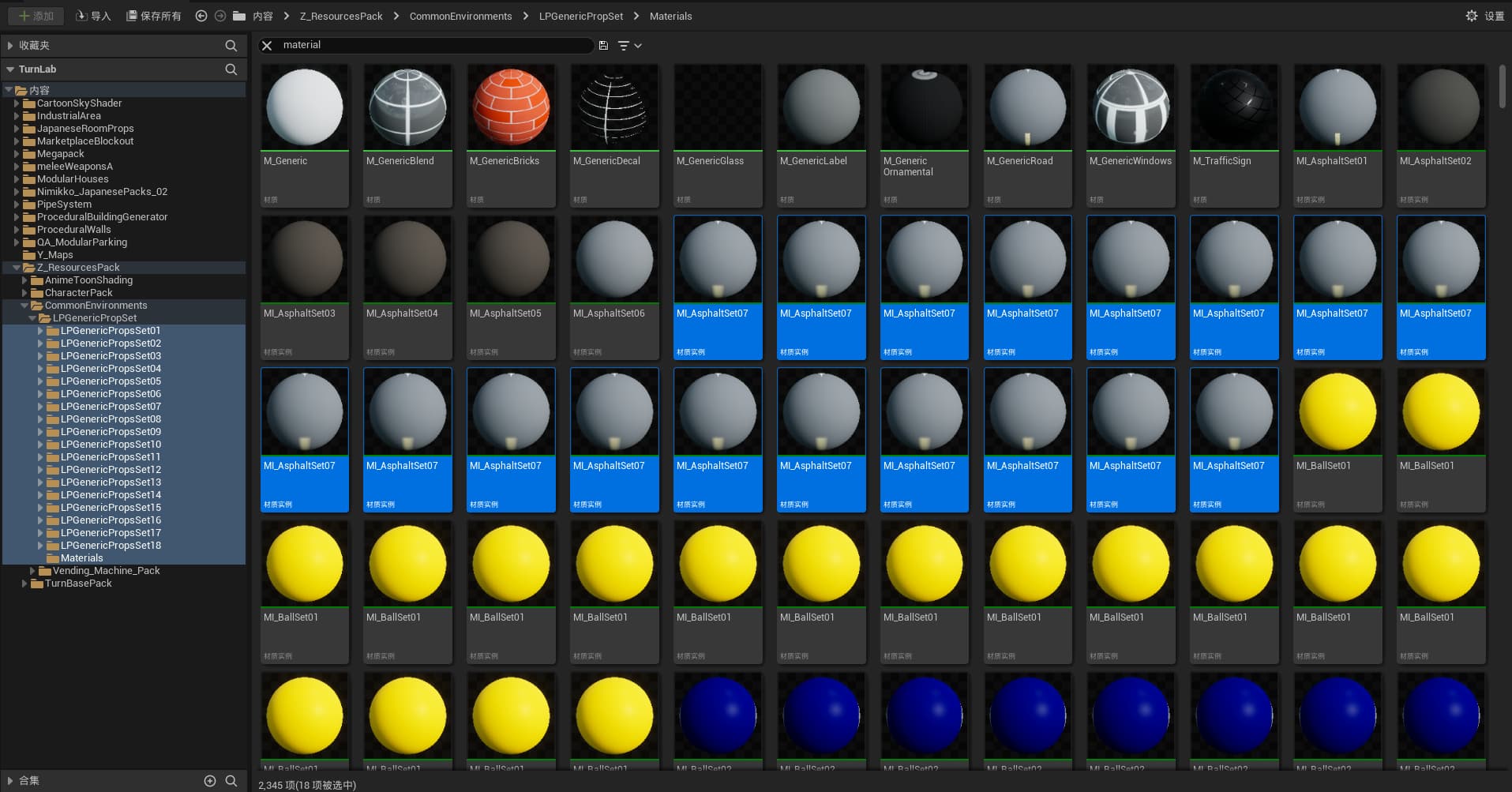
…right up until they actually have to do it consistently.
That is the part that kept sticking with me.
Nobody really argues against good naming. Everybody knows it helps.
Good naming makes search easier.
It makes filtering easier.
It makes batch operations easier.
It makes handoff easier.
It makes projects feel more sane.
But in actual production, naming usually loses to speed.
You import something quickly.
You create a material just to test something.
You duplicate a Blueprint “for now.”
You make a texture variation and promise yourself you’ll rename it properly later.
Later, of course, is where naming goes to die.
That was the pattern I kept noticing. The issue was not that teams do not care. The issue is that manual discipline is fragile.
If the workflow has friction, people skip it.
If naming takes too long, it gets postponed.
If the rules live in a document nobody reads after week two, they may as well not exist.
That was the first real shift for me.
I stopped thinking of naming as a style-guide problem.
I started thinking of it as a workflow problem.
And workflow problems are way more fun to solve.
I didn’t want a naming guide. I wanted a naming assistant
That distinction became the whole project.
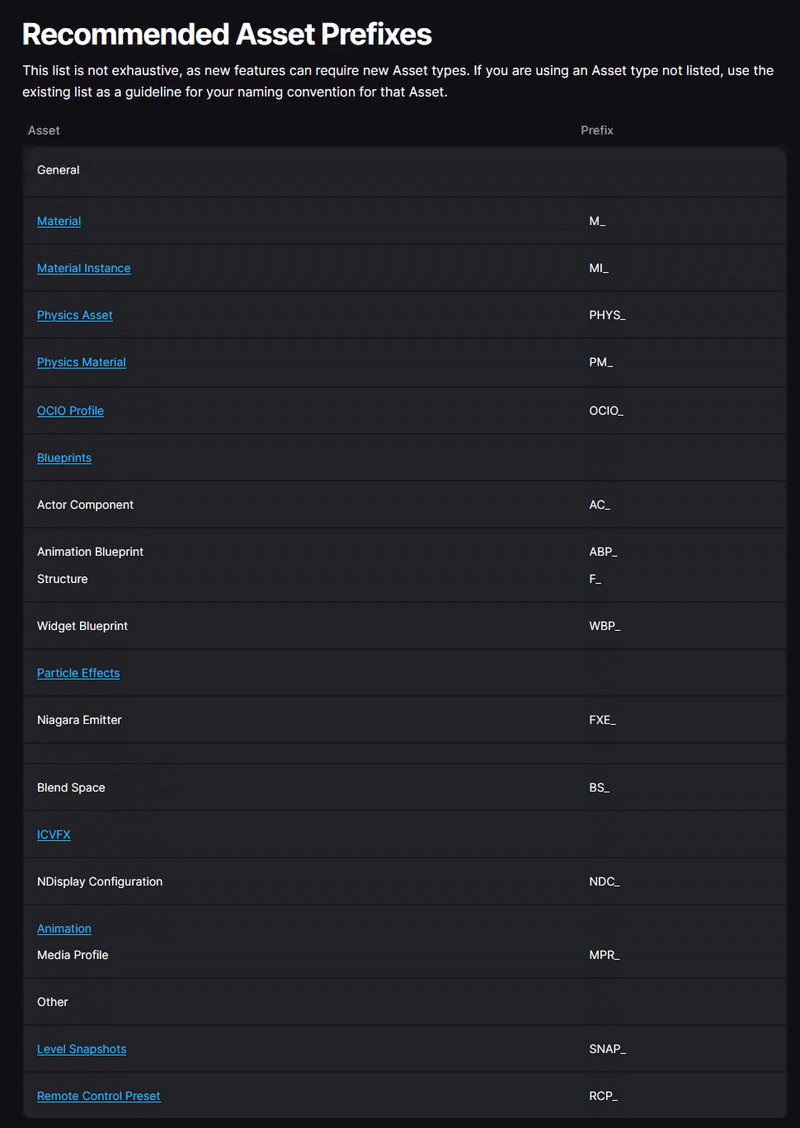
There are already great Unreal naming guides out there. That was never the issue. The issue is that even a good naming convention still depends on humans stopping what they are doing, remembering the format, applying it correctly, checking for collisions, and doing that over and over without getting annoyed.
That is a lot to ask from people who are in the middle of building things.
So instead of asking:
“How do I get people to follow naming rules better?”
I started asking:
“How do I make the correct name the easiest path?”
That question led directly to NsBonsai.
The goal was simple: make naming feel less like paperwork and more like a tiny, quick, in-editor review step.
Not a lecture.
Not a spreadsheet.
Not some giant asset audit six months later.
Just a compact moment where Unreal catches the asset, shows me the output, and lets me confirm the rename cleanly.
That felt like the right direction immediately.
Why “Bonsai” felt like the right name

I liked the name NsBonsai pretty early because it matched the feeling I wanted from the tool.
Not destructive.
Not heavy-handed.
Not “fix your project with one giant refactor.”
More like careful pruning.
Take the thing that grew a bit wild.
Trim it into a cleaner shape.
Keep it healthy while it is still manageable.
That is basically what naming tools should do.
They should not feel like punishment. They should feel like maintenance.
And honestly, that was a big part of the mindset while building this. I did not want a tool that barged into a project and started doing mysterious things behind the scenes.
I wanted something controlled. Predictable. Safe. Something that helps a project stay tidy while it grows.
That is a much more interesting problem than “rename some assets.”
The shape of the plugin became clear pretty fast
Once I had the direction, the structure almost designed itself.
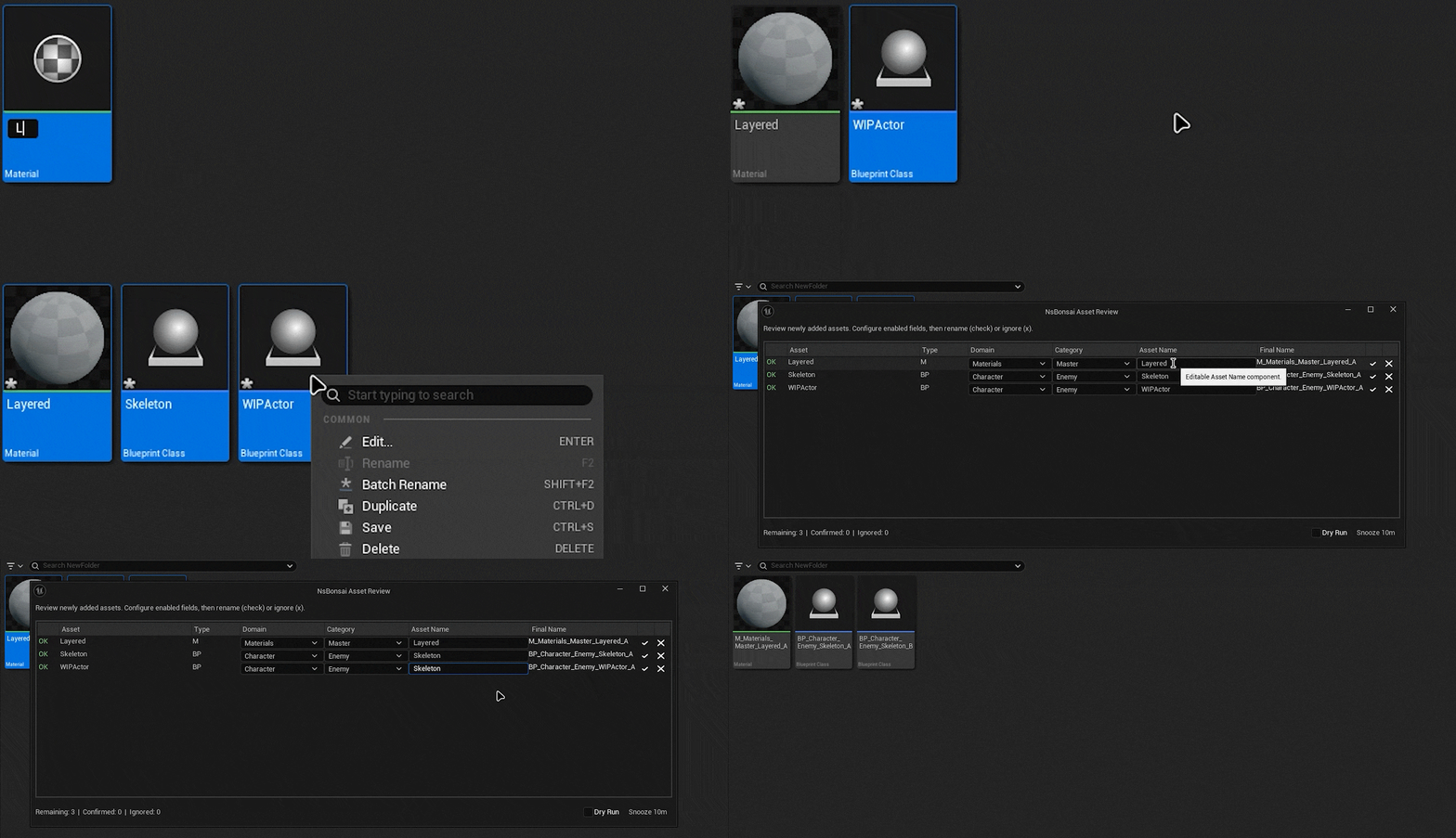
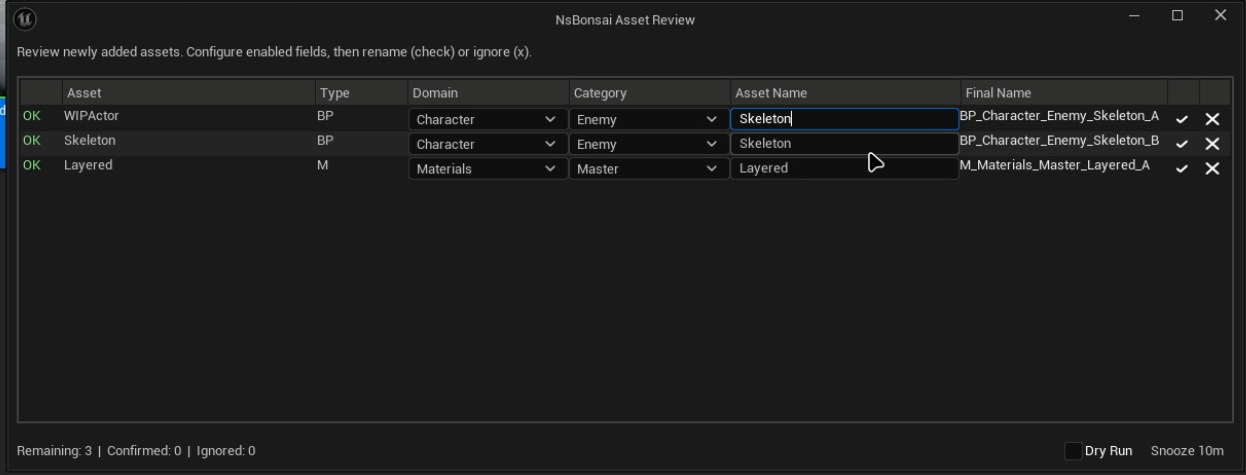
NsBonsai became a lightweight Unreal Editor plugin that watches for newly created or imported assets, waits until they are actually saved, and then opens a compact review table where I can handle naming in one place.
That last part mattered a lot.
I did not want naming to happen too early.
I did not want random popups during creation.
I did not want the plugin fighting the editor.
Waiting until save felt right. That is the point where the asset becomes real enough to care about.
And from there the loop stays simple:
- detect the asset,
- show a review row,
- let me set the tokens,
- preview the final name,
- confirm or ignore.
That simplicity was a big win.
Because the more I thought about it, the more obvious it became that naming tools live or die on one thing:
how annoying they are.
If the tool is slow, people will hate it.
If the UI is noisy, people will ignore it.
If it feels like it is taking control away, people will disable it.
So a lot of the real design work was not just “can it rename assets?” It was “can it do that without becoming a burden?”
The pattern itself had to be strict enough to help, but loose enough to survive real projects
One of the nice things about this plugin is that the naming format is very easy to understand:
<Type>_<Domain>_<Category>_<AssetName>_<Variant>
That gives the name a really useful shape.
Type tells me what kind of asset I am looking at.
Domain tells me the broader area it belongs to.
Category narrows it down.
AssetName is the human-readable part.
Variant handles collisions and versions cleanly.
I liked that because it does not try to be overly clever. It is just structured enough to be useful.
And more importantly, it is deterministic.
That matters a lot in teams.
Two people should not arrive at wildly different names for the same kind of asset just because one of them remembers the convention better. The system should guide them into a consistent result.
That was one of the things I cared about most while building NsBonsai: not just cleaner names, but shared predictability.
The real trick was not renaming. It was making it safe.
This was probably the part that mattered most under the hood.
Renaming sounds simple until you remember that Unreal projects are full of references, editor events, Asset Registry signals, imports, saves, redirects, and all the other little things that can turn a “simple utility” into a source of chaos.
That is why I kept coming back to one principle while building the plugin:
do not be magical.
I really wanted NsBonsai to feel trustworthy.
So the behavior stayed deliberately conservative:
- it does not write metadata into assets,
- it does not force changes without confirmation,
- it uses Unreal’s rename pipeline,
- and it stays focused on the review flow instead of pretending it knows better than the user.
That “zero-diff by design” mindset became one of my favorite parts of the plugin.
Because naming tools can get creepy fast if they start doing hidden bookkeeping. And that was never the vibe I wanted here.
If a rename happens, it should happen because I explicitly confirmed it. That is such a small thing on paper, but it changes the whole feel of the tool.
I also learned that bulk workflows matter more than almost anything else
One asset is easy. Ten assets are still manageable. Fifty imported assets? That is where a tool either proves itself or immediately becomes dead weight.
That is why the compact table and bulk classification side of NsBonsai matters so much to me.
A lot of naming pain is not in understanding the pattern. It is in the repetition.
If I import a whole cluster of foliage assets, I should not have to carefully rebuild the same context over and over. I should be able to classify a bunch of rows, tweak the unique names, verify the output, and move on.
That is the sort of thing that sounds small until you use it. Then it becomes obvious that it is the difference between a nice idea and an actually useful editor tool.
That was a recurring lesson through the whole project:
the best workflow improvements are usually the ones that remove the most repeated tiny annoyances.
Not glamorous. Very real.
The “team” side of the problem turned out to be the most interesting part
At some point, the plugin stopped feeling like a personal helper and started feeling like a team-facing system.
That happened when the token library idea really clicked.
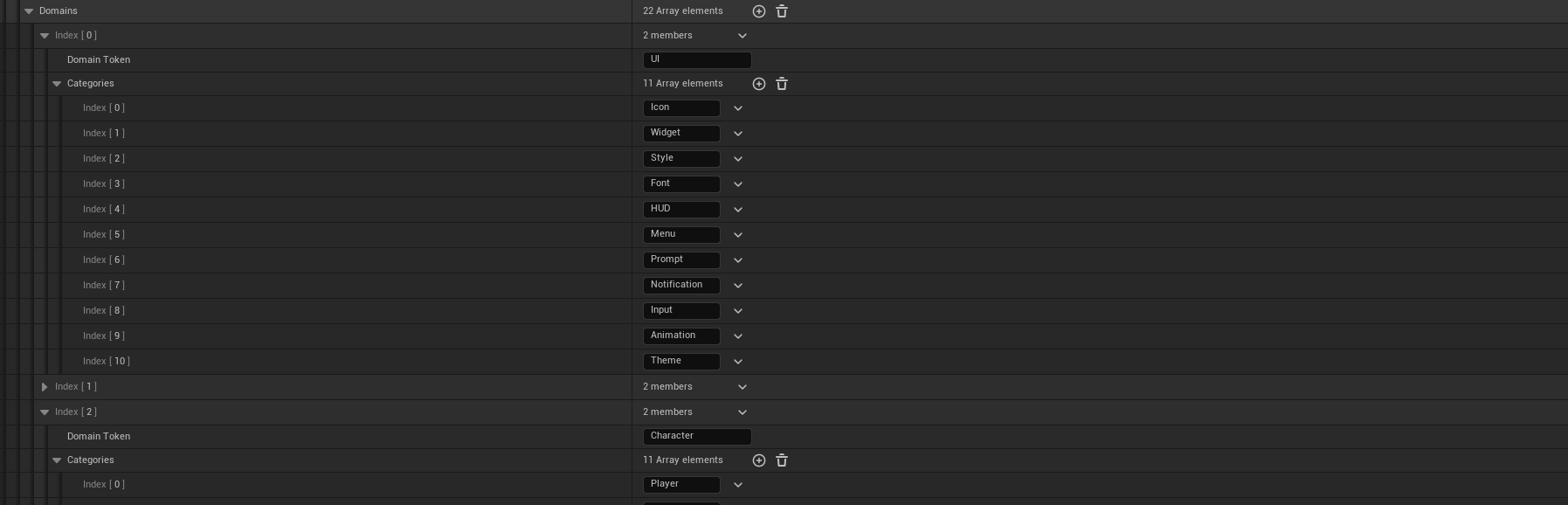
Instead of every person improvising their own domain names or category labels, NsBonsai lets the project define a shared library of tokens. Type rules map asset classes to prefixes. Domains define broader buckets. Categories sit underneath them.
That is such a nice way to keep naming flexible without letting it turn into chaos.
Because the system still adapts to the project - UI, foliage, character, whatever the team needs - but it does so inside a controlled vocabulary.
That was the part I found surprisingly satisfying.
It is not just about making names prettier. It is about reducing ambiguity.
And ambiguity is one of those silent project-killers that does not seem like a big deal until it starts slowing down search, reviews, migrations, and communication.
Once I saw the plugin through that lens, it felt much bigger than “asset renaming.”
It was really about helping projects agree with themselves.
The annoying middle phase: trying not to overbuild the solution
There was definitely a point where I had to keep myself from turning this into a giant system.
Because the temptation is always there.
You start with a focused tool, then suddenly you think:
- maybe it should infer more,
- maybe it should scan folders more aggressively,
- maybe it should auto-fix everything,
- maybe it should enforce twenty extra rules,
- maybe it should become a full project taxonomy platform.
And sure, some of that sounds interesting.
But I think one of the better choices I made here was keeping NsBonsai centered on the actual pain point:
new assets, clear review, safe rename, consistent output.
That focus matters.
Because once utility tools become too ambitious, they stop being pleasant. They become process engines. They start demanding behavior instead of assisting it.
That is exactly what I did not want.
So a lot of this journey was honestly just restraint.
Not building the biggest naming system possible. Building the naming tool I would actually want running in-editor every day.
The small details ended up carrying a lot of the value
Some of my favorite parts of the plugin are not even the flashy ones.
Things like:
- skipping already compliant assets,
- normalization rules for legacy tokens,
- collision-safe variants,
- and deduping the queue so the tool does not spam the editor.
Those are the kinds of details people may never explicitly praise, but they absolutely feel them.
That was another good reminder while building this:
a polished utility tool is usually a pile of small acts of respect for the user’s time.
Every moment of avoided friction matters. Every prevented annoyance matters. Every “good, it didn’t do anything weird” moment matters.
I love systems work for exactly that reason. Sometimes the best compliment a tool can get is that it quietly becomes part of the workflow.
What NsBonsai taught me
Looking back, I think the biggest thing this plugin taught me is that pipeline pain is real design work.
It is easy to look at something like asset naming and treat it as admin. Cleanup. Housekeeping. The boring stuff.
But once you are deep enough into production, those “small” friction points have massive impact.
They affect speed.
They affect searchability.
They affect onboarding.
They affect consistency.
They affect how tired people feel working in the project.
And that last one matters more than people admit.
Good tools do not just save clicks. They lower background stress.
NsBonsai really drove that home for me. It reminded me that sometimes the most valuable plugin is not the flashiest one. It is the one that keeps a project from slowly getting harder to live in.
That is probably why I ended up liking this tool as much as I do.
It solves a very practical problem, but it also solves it in a way that matches how I like building editor workflows: controlled, explicit, low-friction, and respectful of the user.
Final thoughts
NsBonsai did not come from some grand vision.
It came from annoyance.
From repetition.
From seeing the same preventable mess happen often enough that I finally wanted to remove the cause instead of complaining about the symptoms.
And honestly, those are some of my favorite projects.
Because they start grounded. They solve something real. And if they are done well, they make everyday work feel just a bit better.
That is what I wanted here.
Not a naming police plugin.
Not a rigid content dictatorship.
Just a clean little system that helps Unreal projects grow without turning wild.
Which, now that I think about it, is probably a pretty fitting reason to call it Bonsai.
Careful pruning.
Consistent shape.
Healthy growth.
That was the goal from the start.
And I think that is still the part I like most.

